April 28, 2026
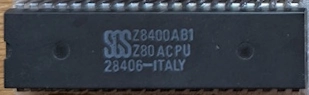
So we found ourselves a Z80 CPU. There are actually several flavors of Z80, with different technologies (NMOS or CMOS) and different speeds (from 4 to 20 MHz). The CPC used a Z80A, which is a NMOS clocked at 4 MHz. And that's exactly what we have here:
Let's decode the cryptic writings on it:
Z8400AB1: Z8400 means it is a Z80 NMOS; A means it is clocked at 4 MHz, B1 means the package is plastic.Z80ACPU: a bit redundant with the line above: it's a Z80A. Other variants would be Z80 at 2.5 MHz, Z80B at 6 MHz, or Z80H at 8 MHz.28406-ITALY: manufactured in Italy, probably during the 6th week of 1984. I have no clue what the leading 2 means. Usually the date is 4 digits, 2 for the year, 2 for the week. With these 5 digits though, the 6th week of 84 is the only date that makes sense.The User Manual is going to be a crucial resource. You know the saying, read the f#%king manual. Everything is in there: pin layout, pin roles, timing, registers, instructions. But it's 318 page long and for now we are only interested in the pinout to wire our little guy and one simple instruction, NOP, to do nothing and move on to the next instruction.
Nothing beats a chip pinout to get an overall understanding of what it does.
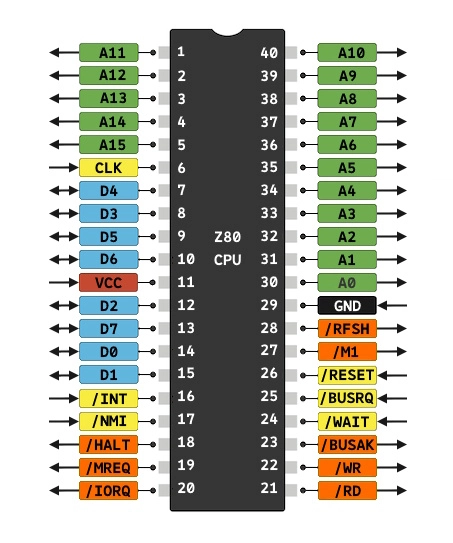
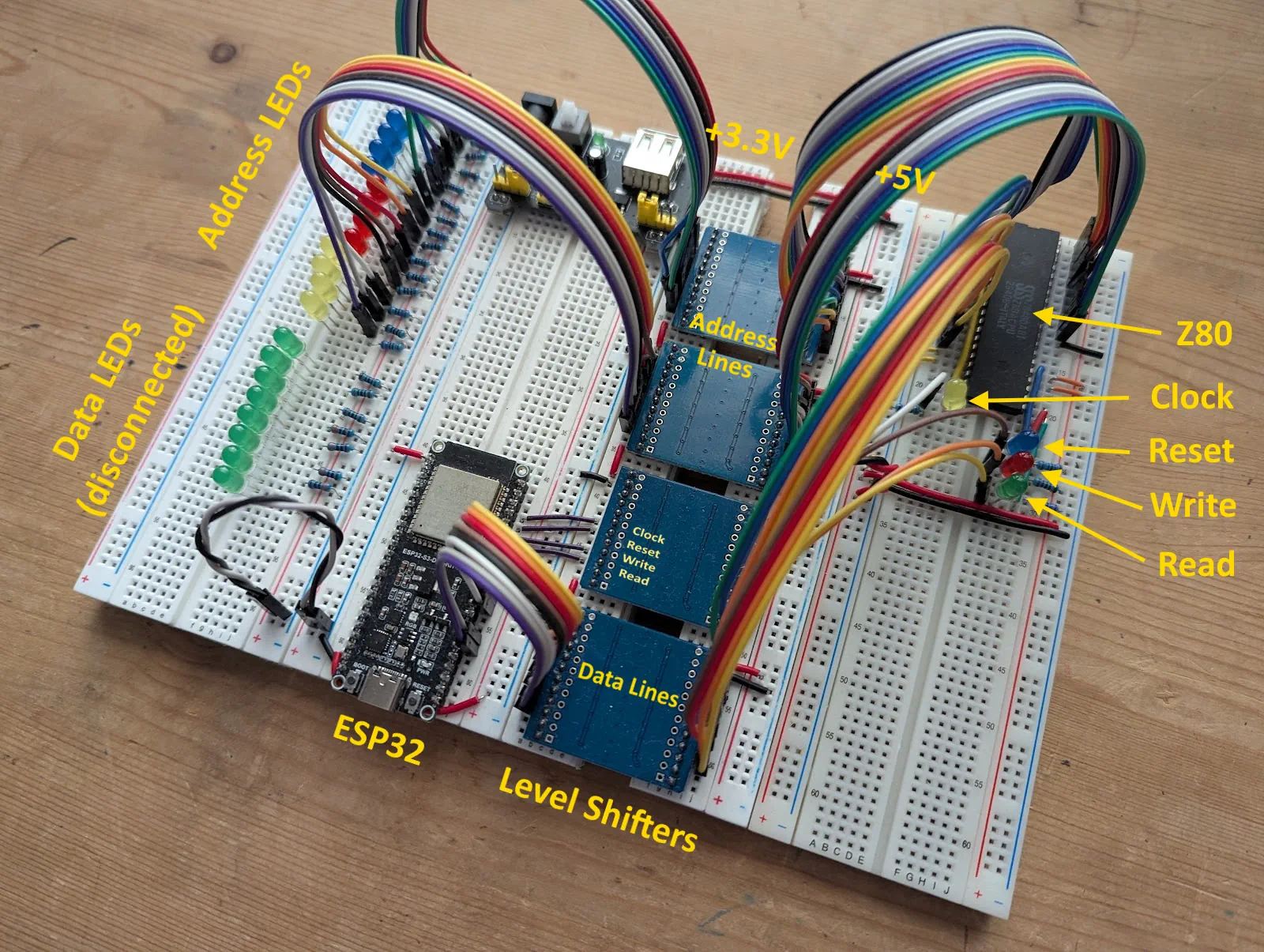
The ESP32 is going to drive our experiment by sending the reset signal, the clock signal, and sending 0 to the eight data lines. We'll connect the address lines to LEDs so we can watch the address increment every time an instruction is executed.
There is a catch though: the Z80 pins operate at +5V whereas the ESP32 operates at +3.3V. If a Z80 pin drives an ESP32 pin, it might damage the ESP32. If an ESP32 pin drives a Z80 pin, the logic signal might not be correctly picked up, which is probably fine. But I don't know much about these things and I don't want to take any chance. So we'll be using level shifters to separate the +5V realm from the +3.3V. The shifters convert signals from one voltage to the other, in both directions. The ones I got are big. I'm sure there is a better, less bulky, alternative, but these will do. They came with horizontal pins that I had to bend with pliers so that I can lay them flat on breadboards. They're so wide they wouldn't fit on one board and I had them span over two boards at first. Until I decided to sacrifice one board and I sawed it in half. I actually like the divide it creates between the two worlds.
Let's start with the easy part. We pick 8 GPIOs on the ESP32 and have it set them to 0.
static const gpio_num_t data_lines[] = {
    GPIO_NUM_40,
    GPIO_NUM_39,
    GPIO_NUM_38,
    GPIO_NUM_37,
    GPIO_NUM_36,
    GPIO_NUM_35,
    GPIO_NUM_48,
    GPIO_NUM_47
};

void setup()
{
    // Set the data bus to 0
    for (const gpio_num_t line : data_lines)
    {
        gpio_set_direction(line, GPIO_MODE_OUTPUT);
        gpio_set_level(line, 0);
    }
}
It is a square wave with a maximum frequency of 4 MHz and a 50% duty cycle, meaning that 50% of the period the signal will be high and it will be low for the rest of the period. I am not sure about what the minimum frequency is. A slow clock on an actual CPC would be a problem because the DRAM needs to be refreshed constantly, and the CPU dictates when that happens. But if we don't have this kind of RAM (and we won't) it shouldn't be a problem.
We will use two ways to tick the clock:
#define GPIO_Z80_CLOCK GPIO_NUM_2

constexpr uint32_t clock_freq_in_hz = 2;
constexpr uint64_t clock_period_in_us = 1000000 / clock_freq_in_hz;
volatile uint32_t z80_clock_state = 0;

void sleep_us(int sleep_time)
{
    const auto end = micros() + sleep_time;
    while (micros() < end) {}
}

void tick_clock()
{
    gpio_set_level(GPIO_Z80_CLOCK, 1);
    sleep_us(clock_period_in_us / 2);
    gpio_set_level(GPIO_Z80_CLOCK, 0);
    sleep_us(clock_period_in_us / 2);
}

void IRAM_ATTR on_z80_clock()
{
    z80_clock_state = 1 - z80_clock_state;
    gpio_set_level(GPIO_Z80_CLOCK, z80_clock_state);
}

void setup()
{
    // ... Data Bus Init...

    gpio_set_direction(GPIO_Z80_CLOCK, GPIO_MODE_OUTPUT);
    gpio_set_level(GPIO_Z80_CLOCK, 0);

    const hw_timer_t* timer = timerBegin(0, 80, true);
    timerAttachInterrupt(timer, &on_z80_clock, true);
    timerAlarmWrite(timer, clock_period_in_us / 2, true);
    timerAlarmEnable(timer);
}
The reset input on the Z80 is active low. Meaning that it is normally high and will trigger a reset when it is pulled low. To do a reset, it must stay low for 3 clock cycles.
#define GPIO_Z80_RESET GPIO_NUM_1

void setup()
{
    // ... Data Bus Init...

    gpio_set_direction(GPIO_Z80_RESET, GPIO_MODE_OUTPUT);

    // Pull the Reset low for 3 clock cycles
    gpio_set_level(GPIO_Z80_RESET, 0);
    for (int i = 0; i < 3; i++)
    {
        tick_clock();
    }
    gpio_set_level(GPIO_Z80_RESET, 1);

    // ... Clock Init...
}
The software has been uploaded to the ESP32, the wiring is done, and the resistors are bracing themselves to protect the LEDs that can hardly contain their excitment. The time has come to power this thing up!
... annnnd, as expected, the blue LED (reset) turns on while the yellow LED (clock) blinks 3 times. Blue turns off, and yellow keeps blinking at a steady pace. Finally the green LED turns on, showing us that the Z80 wants to read its first byte of data. It expects the opcode of the first instruction it should execute and we are sending 0 for a NOP.
The address lines start all off, because it's reading the first instruction at address 0x0000. And then it should go up to 0x0001, 0x0002, 0x0003, etc... except that very quickly it ends up turning every single address line on. Not the expected result at all!
After doing some more research, I realize that all pins combined should NOT draw more than 50 mA. And a single pin should NOT draw more than 20 mA on its own. Right now, I am hooking up 16 LEDs to the address bus. In a previous test, I had all 16 address lines AND all 8 data lines connected to LEDs. 16 LEDs is most likely way too much for our poor little Z80, let alone 24. I also have a vague recollection of a first hasty wiring that resulted in a faint smell of burnt plastic... I may have already fried the CPU!