May 01, 2026
The first test was not a success. I think I fried my CPU in some previous reckless wiring. At least, I've come to realize that testing a sensitive CPU from the 80s should not be done with a bunch of LEDs, guarded by resistors of random values with a complete disregard of the almighty Ohm's law.
I've ordered a new Z80, the same but CMOS, since they are less power hungry, and some say they perform better at low frequencies. But it is coming from far, far away and will only be there in a few weeks.
In the meantime, let's take another look at this poor CPU. Let's use an Arduino Mega 2560 this time and see if we can get a better picture of what is going on. The Arduino has many pins and operates at +5V, so we won't need any level shifters or LEDs, we can just connect it directly to the Z80 to drive its inputs and read its outputs.
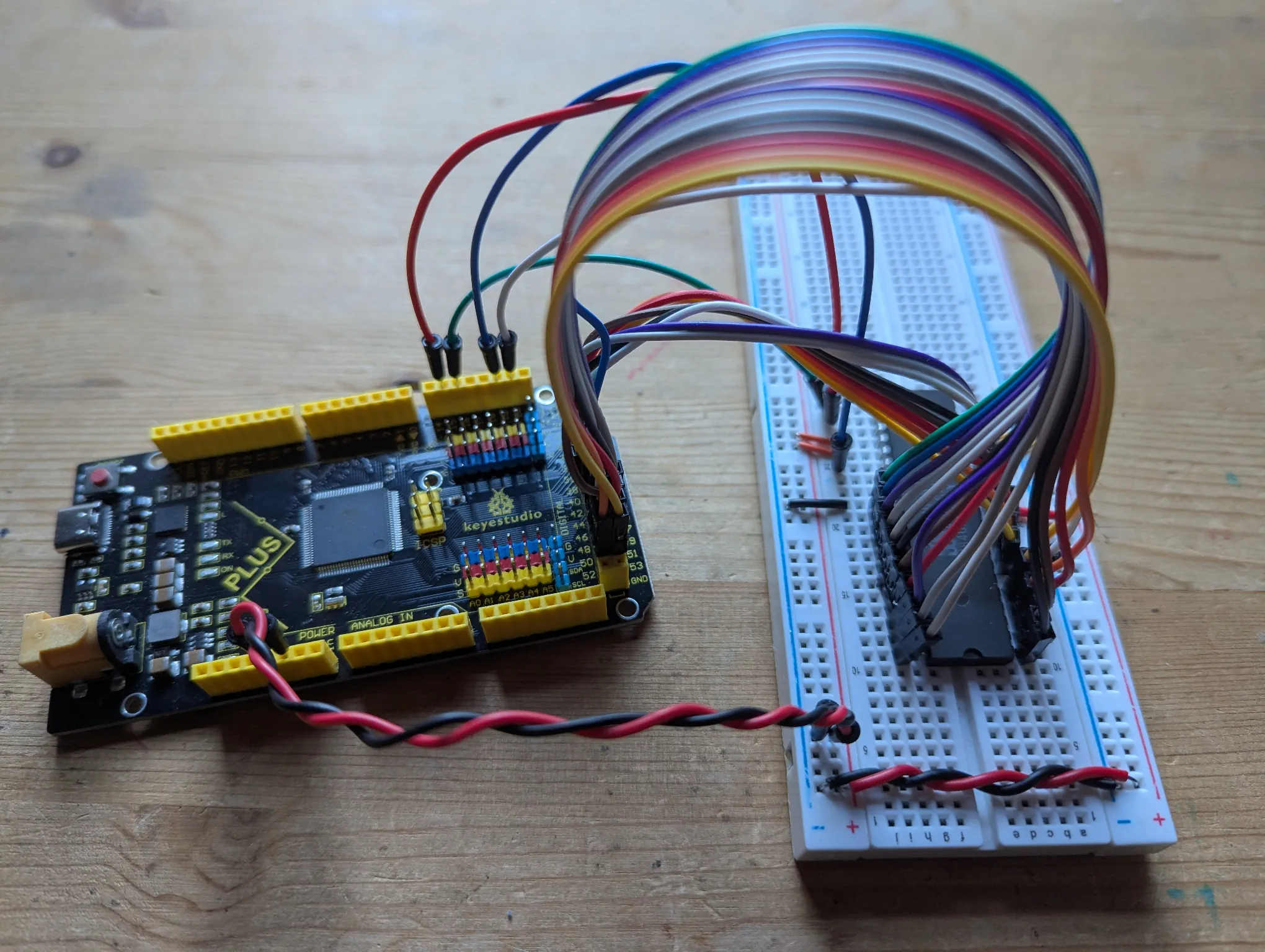
So let's take our Z80 out of this web of wires, lay it on a board on its own and wire the regulars to the Arduino: clock, reset, address, data, and read/write pins.
I also have the strong feeling that we need to take the timing more seriously and get it right. It is important because the address lines we are interested in are not always available for us to read.
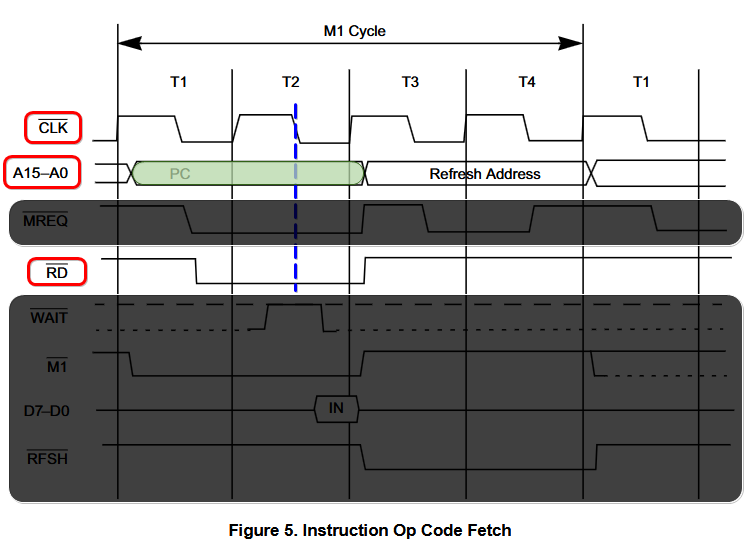
To execute any instruction (include a NOP instruction), the CPU starts by going through the first machine cycle, called M1. This cycle is made of at least four time cycles, ticked by four clock pulses.
/RD signal.NOP instruction, we have nothing to do. We do want to read the address though, and this is our window!Taking all that in consideration, we know that the middle of T2 is when we should be sampling the address lines, at the falling edge of the clock while /RD is active.
With that in mind, let's write the code for Arduino.
The setup code is going to be straightforward. We declare our pins, set them up, and initiate the reset sequence, like we did before with the ESP32.
constexpr uint8_t write_pin = 15;
constexpr uint8_t read_pin = 16;
constexpr uint8_t reset_pin = 19;
constexpr uint8_t clock_pin = 20;

constexpr uint8_t data_pins[8] = { 28, 29, 30, 31, 32, 33, 34, 35 };
constexpr uint8_t address_pins[16] = { 38, 39, 40, 41, 42, 43, 44, 45,
                                       46, 47, 48, 49, 50, 51, 52, 53 };

void setup()
{
    Serial.begin(115200);

    Serial.println("Initializing pins");

    // Reset
    pinMode(reset_pin, OUTPUT);
    digitalWrite(reset_pin, HIGH);

    // Clock
    pinMode(clock_pin, OUTPUT);
    digitalWrite(clock_pin, LOW);

    // Data Pins
    for (auto data_pin : data_pins)
    {
        pinMode(data_pin, OUTPUT);
        digitalWrite(data_pin, LOW);
    }

    // Address Pins
    for (auto address_pin : address_pins)
    {
        pinMode(address_pin, INPUT);
    }

    // Read/Write Pins
    pinMode(write_pin, INPUT);
    pinMode(read_pin, INPUT);

    // Reset sequence: pull reset low, wait 3 clock cycles, and pull reset high again
    Serial.println("Reset Sequence");
    digitalWrite(reset_pin, LOW);
    delay(100);
    for (int i=0 ; i<3 ; i++)
    {
        tick_clock(HIGH);
        tick_clock(LOW);
    }
    digitalWrite(reset_pin, HIGH);

    Serial.println("Ready");
}
This will also be simpler than the ESP32 code. Reading the address lines is the only thing we do, no need to be fancy. The loop sets the clock signal high for half our period and low for the other half. On the falling edge, it checks the read pin, if it's active, it samples the address and makes sure it has a perfect increment of one compared to the last check.
void loop()
{
    tick_clock(HIGH);

    // Check the RD signal in the middle of the Time Cycle at the falling edge of the clock
    if (digitalRead(read_pin) == LOW)
    {
        // Read the current address
        static uint16_t last_address = 0xffff;
        const uint16_t address = read_address_lines();

        // Print the progress
        constexpr uint16_t mask = 0x0fff;
        if ((address & mask) == 0)
        {
            print_format("Checking %04x - %04x", address, address|mask);
        }

        // Print inconsistencies
        if (address != last_address + 1)
        {
            print_format("Inconsistent Address Increment: %04x -> %04x", last_address, address);
        }

        // Remember the address for next time
        last_address = address;
    }

    tick_clock(LOW);
}
A few miscellanous functions to tick the clock, read the address lines and pack them in a 16-bit word, and also to print a formatted string (because sadly, unlike the ESP32, the Arduino library do not have a Serial.printf function).
void tick_clock(uint8_t val)
{
    constexpr uint32_t tick_duration = 1;

    digitalWrite(clock_pin, val);
    delayMicroseconds(tick_duration);
}

uint16_t read_address_lines()
{
    uint16_t address = 0;
    int32_t shift = 0;
    for (auto line : address_pins)
    {
        address |= digitalRead(line) << shift;
        shift++;
    }
    return address;
}

void print_format(const char* fmt, ...)
{
    char buffer[128];

    va_list args;
    va_start(args, fmt);
    vsnprintf(buffer, 128, fmt, args);
    va_end(args);

    Serial.println(buffer);
}
And just like that, our little Z80 is doing exactly what's expected! It executes each NOP nicely and moves on to the next address. It works at any frequency I've tried, from 1 Hz to 500 KHz with a time cycle of 2 µs.
Initializing pins
Reset Sequence
Ready
Checking 0000 - 0fff
Checking 1000 - 1fff
Checking 2000 - 2fff
Checking 3000 - 3fff
Checking 4000 - 4fff
Checking 5000 - 5fff
Checking 6000 - 6fff
Checking 7000 - 7fff
Checking 8000 - 8fff
Checking 9000 - 9fff
Checking a000 - afff
Checking b000 - bfff
Checking c000 - cfff
Checking d000 - dfff
Checking e000 - efff
Checking f000 - ffff
Checking 0000 - 0fff
Checking 1000 - 1fff
Checking 2000 - 2fff
Checking 3000 - 3fff
Checking 4000 - 4fff
This whole time our little friend was fine! I guess it was just in the wrong environment, ticked or read the wrong way, not seen or valued like it deserved. Poor guy!
Next, let's figure out what went wrong in the ESP32 setup with this new knowledge we now possess!