May 12, 2026
In part one of testing the Z80, we thought the microchip was dead. I ordered a new one which is still on its way. In part two, we realized that the chip was actually fine. In this part three, let's find out what is wrong with our first setup and fix it!
We are trying to get the Z80 to execute NOP instructions repeatedly. Internally, its instruction pointer should start at 0 and go up one by one. This was working great in the part two when the Z80 was directly connected to an Arduino Mega 2560. But not so much when it was connected to an ESP32 behind a wall of level shifters to separate the +5V world where the Z80 lives from the +3.3V world where the ESP32 lives.
In part two, we also learned when to actually sample the address lines coming out of the Z80. There is one specific short window of time when the address is up on the Z80 pins and can be read. The rest of the time, we might - and probably will - get very different values.
So let's start cleaning up the ESP32 code to actually read the address when we are supposed to, which is on the falling edge of the clock while the /RD signal is active. And here it is, the code cleaned up. It does a couple of other things that we setup when displaying a frame buffer, but I only left what matters to us here.
// GPIOs
const gpio_num_t GPIO_Z80_CLOCK = GPIO_NUM_2;
const gpio_num_t GPIO_Z80_RD = GPIO_NUM_41;

static const gpio_num_t address_lines[] = {
    GPIO_NUM_14,
    GPIO_NUM_13,
    GPIO_NUM_12,
    GPIO_NUM_11,
    GPIO_NUM_10,
    GPIO_NUM_9,
    GPIO_NUM_46,
    GPIO_NUM_3,
    GPIO_NUM_8,
    GPIO_NUM_18,
    GPIO_NUM_17,
    GPIO_NUM_16,
    GPIO_NUM_15,
    GPIO_NUM_7,
    GPIO_NUM_6,
    GPIO_NUM_5
};

constexpr uint32_t clock_freq_in_hz = 1;
constexpr uint64_t clock_period_in_us = 1000000 / clock_freq_in_hz;
volatile uint32_t z80_clock_state = 0;
volatile uint16_t z80_pc = 0;
volatile bool z80_pc_changed = false;

void IRAM_ATTR on_z80_clock()
{
    z80_clock_state = 1 - z80_clock_state;
    gpio_set_level(GPIO_Z80_CLOCK, z80_clock_state);

    // Read the address if we are on the falling edge of the clock while Read is active
    if (z80_clock_state == LOW && gpio_get_level(GPIO_Z80_RD) == LOW)
    {
        z80_pc = 0;
        int shift = 0;
        for (auto line : address_lines)
        {
            z80_pc |= gpio_get_level(line) << shift;
            shift ++;
        }

        z80_pc_changed = true;
    }
}

void setup()
{
    // init code...

    gpio_set_direction(GPIO_Z80_CLOCK, GPIO_MODE_OUTPUT);
    gpio_set_level(GPIO_Z80_CLOCK, LOW);

    for (auto line : address_lines)
    {
        gpio_set_direction(line, GPIO_MODE_INPUT);
        gpio_set_pull_mode(line, GPIO_PULLDOWN_ONLY);
    }

    gpio_set_direction(GPIO_Z80_RD, GPIO_MODE_INPUT);
    gpio_set_pull_mode(GPIO_Z80_RD, GPIO_PULLUP_ONLY);

    // Setup the Z80 clock timer
    hw_timer_t* timer = timerBegin(1, 80, true);
    timerAttachInterrupt(timer, &on_z80_clock, true);
    timerAlarmWrite(timer, clock_period_in_us/2, true);
    timerAlarmEnable(timer);
}

void loop()
{
    // loop code...

    if (z80_pc_changed)
    {
        z80_pc_changed = false;
        Serial.printf("PC: %04x\n", z80_pc);
    }
}
The code is cleaned up, and when we run it, this is what it prints:
Resetting Z80... done.
PC: 0000
PC: 0000
PC: fffe
PC: fffe
PC: fffe
PC: fffe
PC: fffe
PC: fffe
PC: fffe
PC: fffe
Like any debugging session, let's start by reducing the problem space as much as we can. A good start would be to figure out whether the problem is in the ESP32 code or in the wiring. Using the same code we've used with the Arduino in part two, which was working as intended, we get the same errors:
Inconsistent Address Increment: fffe -> fffe
So the problem is most likely the wiring. Let's take a closer look.
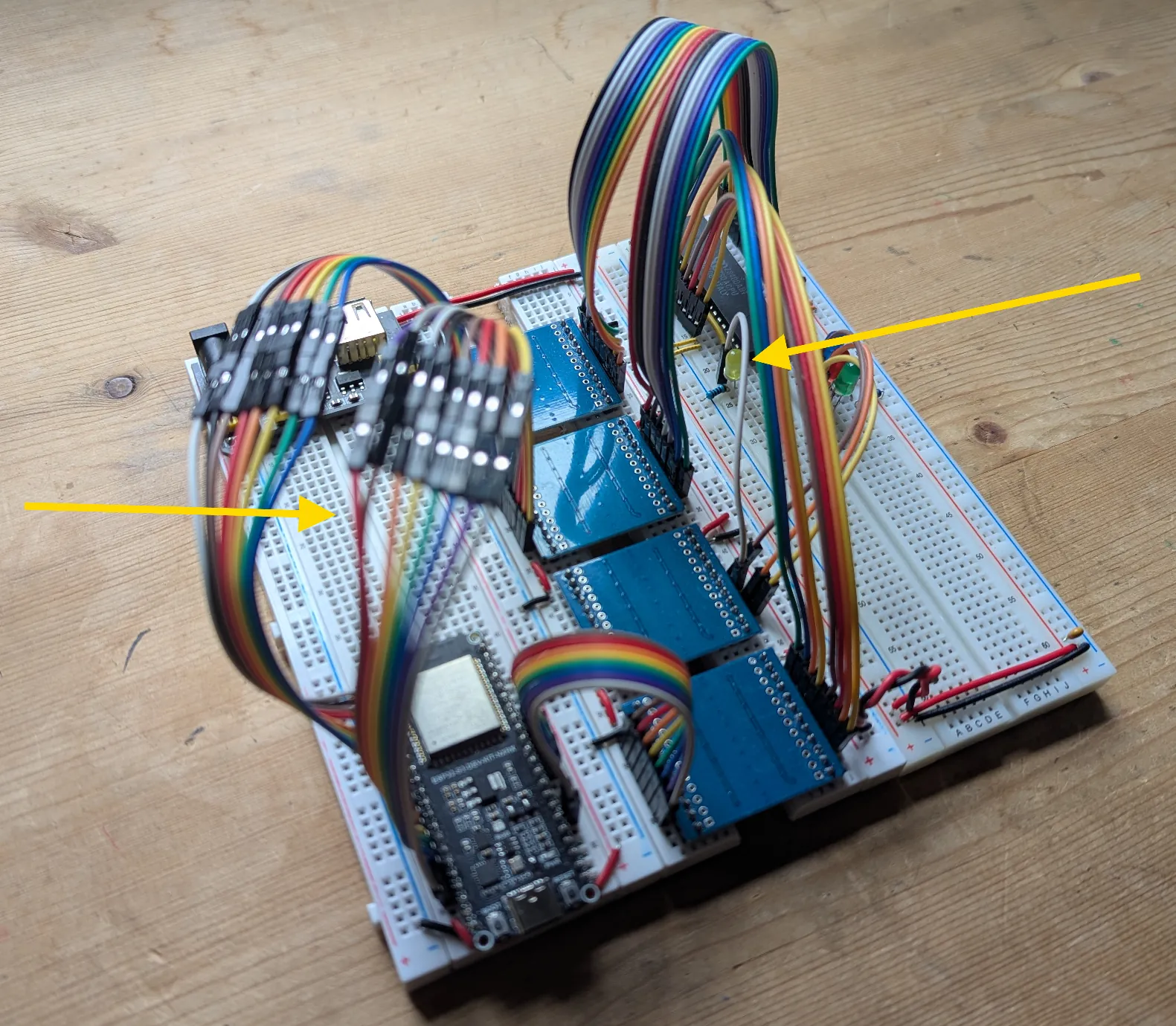
This fffe address is a little sus. And checking the pins on the ESP32, sure enough, they are all shifted by one! The last pin is not on GPIO_NUM_5, but on GPIO_NUM_4. Fixing this, the addresses become all ffff. At least now the error is consistent!
I have four LEDs hooked up to my circuits to help me out since I'm winging this without an oscilloscope. I've noticed that the green LED, connected to the /RD signal seems to be always on. Also, the red LED, connected to /WR, sometimes lights up. The green one should only turn on briefly, once per instruction. The red one, since we're only executing NOP instructions should never turn on. While cleaning up the wires around them to make sure they're properly connected, I had a weird feeling that something was missing. And yup! When I transferred the Z80 to its own board to test it with the Arduino, I've also transferred the four connections to pull the /INT, /NMI, /BUSRQ, and /WAIT signals high. I forgot to bring them back to the ESP32 setup and these signals couldn't be any less random! A facepalm later, they're back.
Still not working, still stuck at address ffff, and The /RD seems to be always on. The frustration is growing... Checking the wiring again, I'm getting the LEDs out of the way so that I can see better, and, just like that, the program counter is working! Looks like the LEDs that were my "trusty" helpers to make sense of what the CPU is doing were the problem all along!
Trying to put them back on one by one, I quickly find the culprit: the yellow LED connected to the clock signal. The three others (reset, read, and write) LEDs are not causing any trouble. I suspect that the resistor that protects the clock LED also acts as a voltage divider and is keeping us from sending a clean clock signal, which is crucial to the CPU.
So with that stupid resistor out of the way, we can restore the test. We still have errors, but things are getting better. This is what we are looking at now:
Ready
Checking 0000 - 0fff
Inconsistent Address Increment: 003f -> 0080
Inconsistent Address Increment: 00bf -> 0040
Inconsistent Address Increment: 007f -> 00c0
Inconsistent Address Increment: 013f -> 0180
Inconsistent Address Increment: 01bf -> 0140
Inconsistent Address Increment: 017f -> 01c0
Inconsistent Address Increment: 023f -> 0280
Inconsistent Address Increment: 02bf -> 0240
Inconsistent Address Increment: 027f -> 02c0
...
Inconsistent Address Increment: 0e3f -> 0e80
Inconsistent Address Increment: 0ebf -> 0e40
Inconsistent Address Increment: 0e7f -> 0ec0
Inconsistent Address Increment: 0f3f -> 0f80
Inconsistent Address Increment: 0fbf -> 0f40
Inconsistent Address Increment: 0f7f -> 0fc0
Inconsistent Address Increment: 103f -> 1080
Inconsistent Address Increment: 10bf -> 1040
...
Inconsistent Address Increment: 1a3f -> 1a80
Inconsistent Address Increment: 1abf -> 1a40
Inconsistent Address Increment: 1a7f -> 1ac0
Inconsistent Address Increment: 1b3f -> 1b80
Inconsistent Address Increment: 1bbf -> 1b40
There is a clear pattern here. Can you see it? If we only look at the last digits of these 16-bit words, we're left with:
3f -> 80
bf -> 40
7f -> c0
Which in binary looks like:
Bit #
7654 3210    7654 3210
----------------------
0011 1111 -> 1000 0000
1011 1111 -> 0100 0000
0111 1111 -> 1100 0000
This looks like bits 6 and 7 are inverted. And checking the wires, here they are!
After plugging these two wires back where they belong and getting rid of the yellow LED and its resistor, the Z80 is nicely ticked and nicely read. We're all good!
Checking 0000 - 0fff
Checking 1000 - 1fff
Checking 2000 - 2fff
Checking 3000 - 3fff
Checking 4000 - 4fff
Checking 5000 - 5fff
Checking 6000 - 6fff
Checking 7000 - 7fff
Checking 8000 - 8fff
Checking 9000 - 9fff
Checking a000 - afff
Checking b000 - bfff
Checking c000 - cfff
Checking d000 - dfff
Checking e000 - efff
Checking f000 - ffff
It's beautiful! And we've learn a couple things during the process. Having reached the age of presbyopia, I must put my glasses on. Off-by-one errors are easily made with these little wires. Also, just like the double-slit experiment, observing these microchips (with LEDs) might change their behaviors, sometimes in treacherous ways!

Now that we have a well behaved Z80, executing NOP instructions forever, let's reward it with something a little more interesting: adding stuff up! Which will involve reading and writing values in memory. Exciting!